AI By Industry

AI for Lawyers and Law Firms

AI shouldn't give legal advice, and in a small firm it doesn't need to. The useful work is at intake: getting the facts a lawyer needs before the first conversation, answering the phone when nobody can, replying to the questions every new caller asks, and keeping a record of what happened to every inquiry.

People looking for a lawyer often contact more than one firm. The firm that answers and follows up clearly has an edge before anyone talks about the case.

Book 30 minutes with Chris
[digital project] image of website design on a laptop (for a graphic design studio)
Market Data

The firms you compete with are already shopping for AI

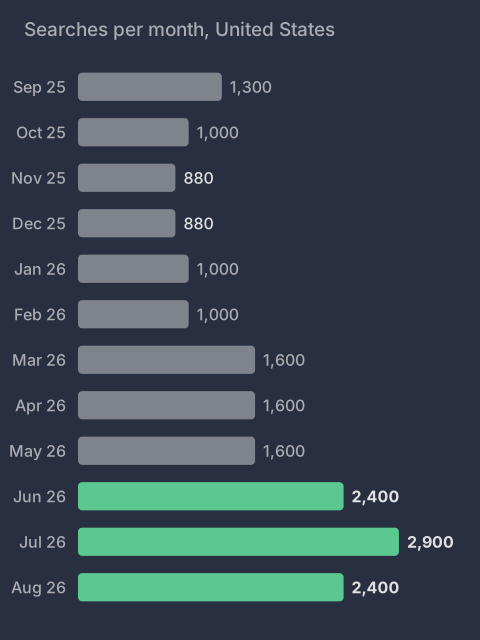
Monthly US Google searches for “ai for law firms” went from 880 in November and December 2025 to 2,900 in July 2026. Searches for “ai for lawyers” held between 1,900 and 2,900 a month all year. Advertisers pay about $55 to $61 a click to reach those searchers, so vendors are competing hard for law firms' attention.

Source: Google Ads search volume and cost per click, via DataForSEO, September 2025 to August 2026, pulled September 12, 2026.

Those searches aren't clients. They're other firms getting ready to answer faster than you do. Someone who needs a lawyer often contacts more than one firm, and the first clear answer has the edge before anyone talks about the case. If your intake still waits for an attorney to get out of court, the firm down the street that fixed theirs gets the call back first.

Find out where your intake loses that race. It takes 30 minutes.

Monthly US searches for ai for law firms rose from 880 in late 2025 to 2,900 in July 2026.
AI Privacy

Using AI on client files without giving them away

The real question isn't whether AI can help with case work. It's where your client's information goes. That has a concrete answer, and you choose it.

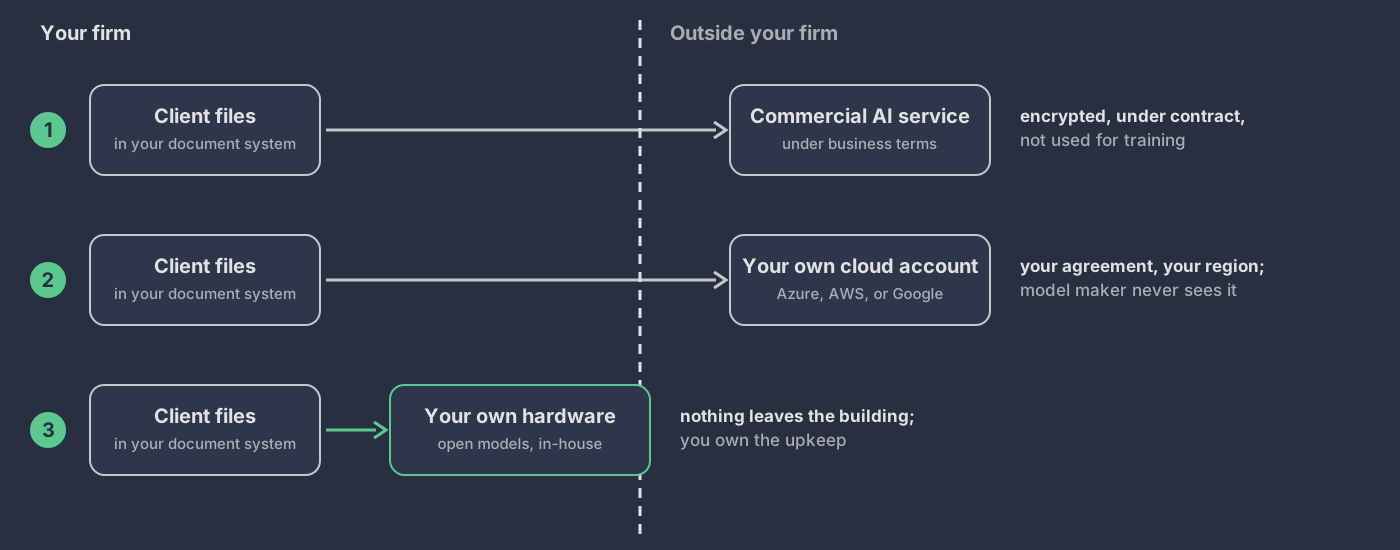
Where client files go for each option: a commercial AI service, where files leave the firm encrypted and under contract; your own cloud account, where the model maker never sees them; or your own hardware, where nothing leaves the building.

Three places the AI can run

  • A commercial AI service, under business terms. Providers such as Anthropic and OpenAI offer business terms under which your data isn't used to train their models, and some offer zero data retention by agreement. Your files leave the firm, encrypted and under contract.
  • Your firm's own cloud account. The model runs inside your Microsoft Azure, Amazon Web Services, or Google Cloud account, in the region you choose, under the agreement you already have. The company that made the model never receives your files.
  • Your own hardware. Open models run on machines you control, and nothing leaves the building. The trade-off is less capable models, and your firm owns the security and upkeep.

What makes it safe to use on a matter

  • Files stay where they live. The AI reads from your document or practice management system. It doesn't keep a second copy.
  • Ethical walls carry over. People only get answers from matters they're staffed on.
  • Every answer cites its source, and an attorney reviews it before anything reaches a client.
  • Every question is logged: who asked what, about which matter.

ABA Formal Opinion 512 asks lawyers to understand how a tool handles client information before using it, and in some cases to get the client's informed consent first. Your ethics counsel decides what your setup needs. This is where AI Workflow Implementation starts: one practice group, one job, on the setup you approve.

Package One

Customer Discovery System: the client who searches finds you, and reaches an attorney

Someone looking for a lawyer compares a few firms in a few minutes. They choose the one whose page answers their question and whose contact path works. The Customer Discovery System builds that path from end to end: your Google profile, your practice pages, your listings, and a contact form that collects the matter type, the county, and the names a conflict check needs.

Every step carries the same name, phone, and practice areas. Before handoff, a test call and a test form both reach a named attorney. One project, $9,000, one time. No endless monthly retainers.

See the Customer Discovery System

1. A page for each practice area

Who it's for, what to bring to the first meeting, the attorneys' bar admissions, and one clear way to book a consultation.

2. One set of facts everywhere

Your firm name, phone, hours, and practice areas match on your website, your Google profile, and the legal directories you choose.

3. Answers search and AI tools can read

Your practice areas, counties, and how consultations work, written so a search engine or an AI answer can cite them correctly.

4. A contact path you can count

Every call and form is tracked by page, so you can see which practice areas bring in new matters.

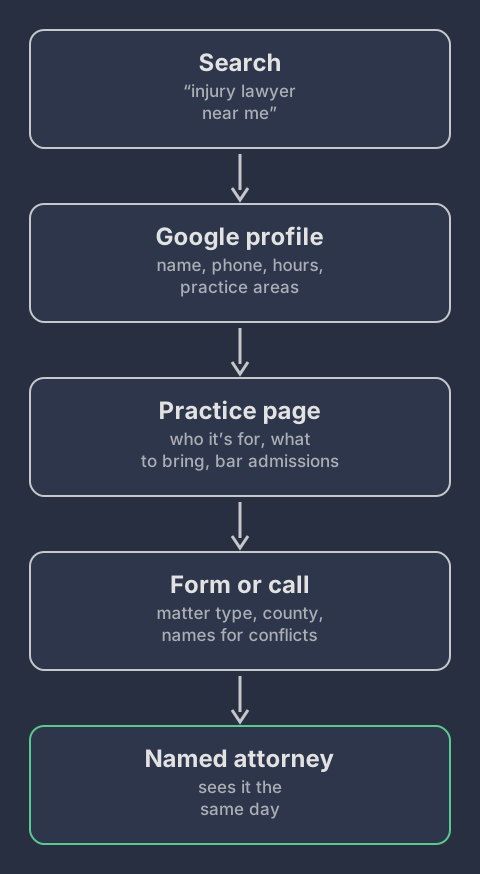
How a new client finds a small law firm: a search for an injury lawyer, the Google profile, the practice page, the form or call, then a named attorney who sees it the same day.

What it looks like when it's done

  • A practice page a client can act on. One page for each practice area, with who it's for, what to bring, the attorneys' bar admissions, and one way to book.
  • The same facts everywhere. Name, phone, hours, and practice areas match on the website, the Google profile, and the legal directories you chose.
  • An intake path that reaches an attorney. A test call and a test form both land with a named attorney, with the matter type and county attached.
  • A handoff you can check. Analytics counts calls and forms by page, and every login and setting is written down and in your name.

Package Two

Lead Response System: the inquiry that arrives at 7:40 PM still gets an answer

Inquiries arrive while you're in court, in a deposition, or at dinner. The Lead Response System answers each one right away, with a notice that this isn't legal advice and what happens next. It saves the matter type, the county, and the other parties to one record, and puts the inquiry at the top of the right attorney's queue the next morning.

Every inquiry ends with a recorded outcome: consultation booked, referred out, declined, or no response. Whether to take the matter stays with the attorney.

See the Lead Response System

1. Calls that don't go to voicemail

A call during court, after hours, or over lunch gets answered. The caller hears that this is not legal advice, and a person on your team sees it the same day.

2. A missed call gets a text back

If a call is missed anyway, the caller gets a text right away with what happens next, so they don't move on to the next firm on the list.

3. Replies to the questions every caller asks

What you handle, where you practice, how consultations work, what to bring. The answers come only from facts you've approved, never from a model's guess about the law.

4. A record of every inquiry

Each inquiry ends with an outcome: consultation booked, referred out, declined, or no response. You can see where new matters come from, and where they slip.

The 7:40 PM inquiry: acknowledged at once, details saved by 7:41 PM, first in the attorney's queue at 8:15 AM, ending in a recorded outcome.

What it looks like when it's done

  • An after-hours test call gets answered. The caller hears the not-legal-advice notice and what happens next.
  • A missed test call gets a text back. The caller has a next step before they try another firm.
  • Every test inquiry lands in one record. Matter type, county, and the other parties are saved, and the inquiry is in the right attorney's queue.
  • Every inquiry has an outcome. Booked, referred out, declined, or no response, and the backup works when the main path fails.

Package Three

SaaS Replacement: leave one tool without losing a matter

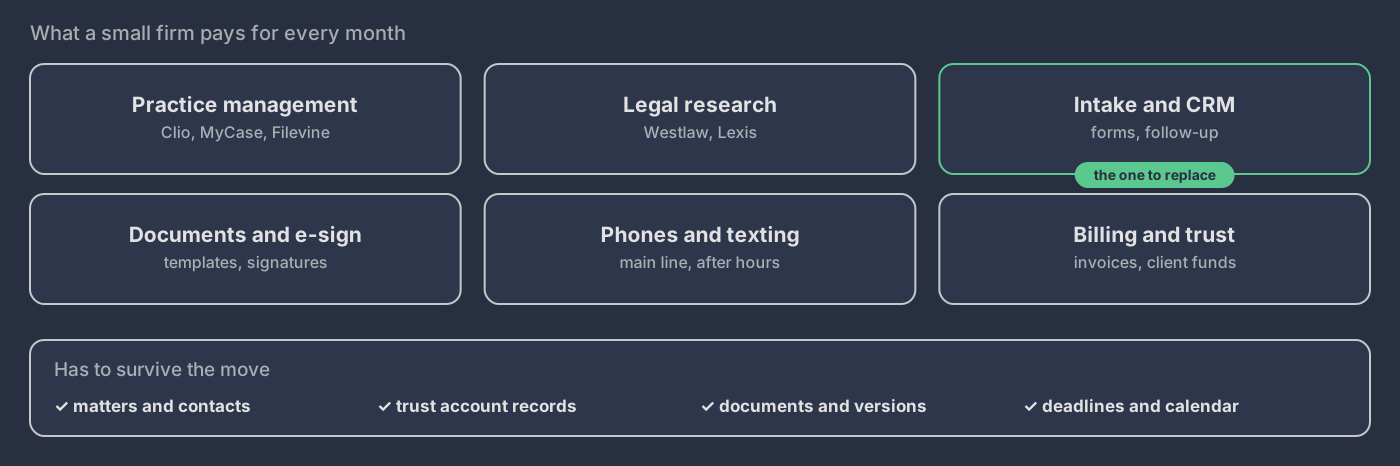
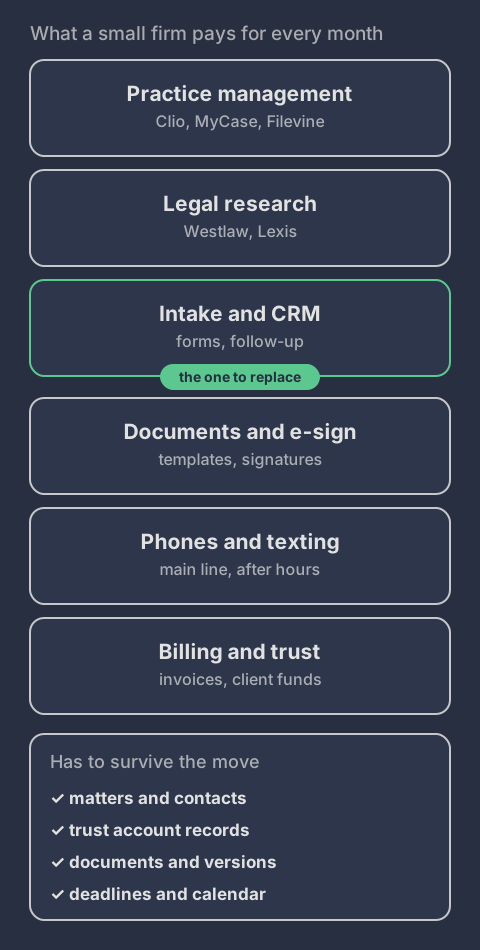
A small firm pays every month for practice management, research, intake, documents, phones, and billing. Sometimes one of them costs too much or no longer fits how the firm works. SaaS Replacement starts with a paid decision plan that maps everything that depends on that one tool, before anything moves.

For a law firm, the records that have to survive come first: matters and contacts, trust account records, documents and their versions, and every deadline on the calendar. If leaving isn't safe, the plan says so before you pay for a replacement.

See SaaS Replacement

1. A map of what depends on the tool

Matters, contacts, documents, calendar entries, and trust account records: everything the software holds that has to survive a switch.

2. A straight answer on whether to leave

Keep it, set it up differently, renegotiate, or replace it. If leaving isn't worth it, you hear that before you pay for a replacement.

3. Data that's moved and checked

Totals and spot checks match the old system before anyone relies on the new one.

4. A way back, and your call on canceling

The old tool stays available until the new one passes its tests. Canceling or downgrading is always your decision.

Six kinds of software a small firm pays for, with intake marked as the one to replace, and the records that must survive the move.

What it looks like when it's done

  • The work runs in the new setup. Your team handles a normal week of matters in the replacement, from the instructions they were given.
  • The records check out. Matters, contacts, documents, and trust account records match the old system on totals and spot checks.
  • There's a way back. The old tool stays available until the new one passes its tests, and the steps to switch back are written down.
  • Canceling is your call. Every license and monthly cost is listed, and you decide when the old subscription goes.

Package Four

AI Workflow Implementation: conflict-check prep, with the decision left to the attorney

Conflict checks repeat on every new matter, and they can't be skipped. AI Workflow Implementation can take the prep: read the intake, pull out the client, the opposing party, and related names, check them against your client and adverse-party list, and hand the attorney a packet with every match flagged and its source linked.

The software stops there. Whether there is a conflict, and whether to take the matter, is the attorney's decision. That boundary is built into the workflow and tested before launch, not just written into a policy.

See AI Workflow Implementation

1. Conflict-check prep

Names from the intake are pulled out and checked against your client and adverse-party list, and the attorney gets a packet with every match flagged.

2. A summary before the consultation

The form and the call notes become a one-page summary, so the attorney walks in knowing the matter type, the county, and the parties.

3. Chasing what's missing

Unsigned engagement letters and missing documents get reminders on a schedule you set, and you can see who is complete without opening every email thread.

4. A person approves every decision

The software prepares and reminds. Whether there's a conflict, whether to take the matter, and anything that sounds like advice stays with the attorney.

Conflict-check prep: software reads the intake, pulls names, checks them, and prepares a packet. A line marks where the software stops and the attorney decides.

What it looks like when it's done

  • A real intake runs through it. The attorney gets a conflict-check packet with every match flagged and its source linked.
  • Hard cases go to a person. Missing names, unclear matches, and system failures land with someone on your team, not in a silent queue.
  • More than one person can run it. Your staff can operate it, fix it, and take it over without calling me.
  • Every step leaves a record. You can see what the software prepared and what the attorney decided.

What stays with the lawyer

  • Legal advice, and any answer that depends on a person's facts.
  • The conflict decision and whether to take the matter.
  • Fees, engagement terms, and anything that forms an attorney-client relationship.

The American Bar Association's Formal Opinion 512 (2024) covers lawyers' duties when using generative AI, including competence, confidentiality, communication with clients, and fees. Your state bar may add its own guidance and advertising rules. Ask any vendor where intake data goes and who can see it.

Where to start

Start with the front door, not the back office. Before AI does anything clever, every call and form should reach a person, and you should be able to count them. That is the Customer Discovery System: your website, Google profile, listings, and contact path, built and tested as one project for $9,000, one time. No endless monthly retainers.

If inquiries already arrive and some of them slip, start with the Lead Response System. If the pain is one job, like intake and conflict-check prep, that is AI Workflow Implementation.

Not sure which one fits? Take the free assessment.